
PingSMS1.0.1 - Google Play
You'll be able to see results in few seconds.
Publisher Description
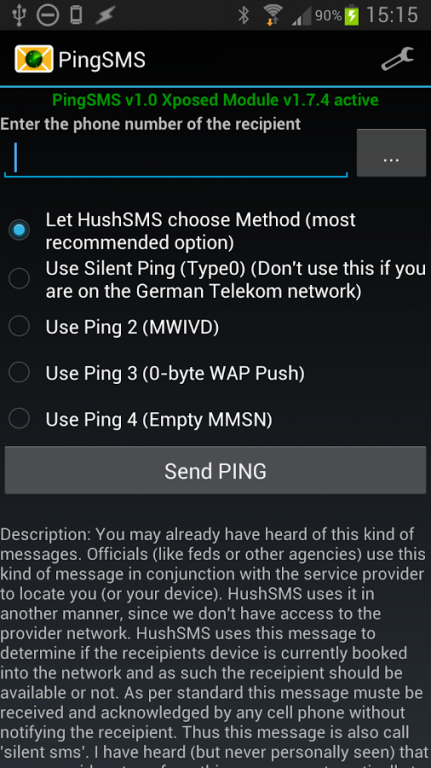
PingSMS is often also called Stealth SMS or Silent SMS or Type 0 SMS and lets you determine if the recipient phone is switched on / booked into the network or not. If it is not you will receive a notification as soon as it is available again.
NOTE: I have a 24h refund policy extending the usual 15 minutes from Google. If you can't get to work send me an email. I will try to help you. If we cannot get it running on your device I will refund your money!
This is a GSM only App. It will not work on CDMA Networks.
You may already have heard of this kind of messages. Officials (like feds or other agencies) use this kind of message in conjunction with the service provider to locate you (or your device). HushSMS uses it in another manner, since we don’t have access to the provider network. HushSMS uses this message to determine if the receipients device is currently booked into the network and as such the receipient should be available or not. As per standard this message muste be received and acknowledged by any cell phone without notifying the receipient. Thus this message is also call “silent sms”. I have heard (but never personally seen) that some providers transform this message automatically to an empty default message. Thus, if this is true, the senders number is shown, but no one will guess why an empty message was sent.
It works on devices where the sendRawPdu API Method is present which is only on HTC Devices with stock ROM and Sense UI.
It will also work on Android >= 4.0 devices which have the Xposed Framework installed. If that is the case for your device please download and install the Xposed Helper Module from here:
https://www.silentservices.de/android-hushsms-xposed-helper-module/
The current version of the Xposed Module is 1.7.8 which is the minimum version required by Ping SMS to work properly. If you have a HTC Smartphone with Sense UI you will not need the Xposed Module!
A full description of all kind of messages can be found here: https://www.silentservices.de/products/android-hushsms/
Ping SMS is also part of HushSMS which can be found on my Homepage.
Graphics form http://www.clker.com (Mainly form User: OCAL) Thanks!
About PingSMS
The company that develops PingSMS is Silent Services UG (haftungsbeschränkt). The latest version released by its developer is 1.0.1.
To install PingSMS on your Android device, just click the green Continue To App button above to start the installation process. The app is listed on our website since 2013-12-28 and was downloaded 0 times. We have already checked if the download link is safe, however for your own protection we recommend that you scan the downloaded app with your antivirus. Your antivirus may detect the PingSMS as malware as malware if the download link to com.silentservices.pingsms is broken.
How to install PingSMS on your Android device:
- Click on the Continue To App button on our website. This will redirect you to Google Play.
- Once the PingSMS is shown in the Google Play listing of your Android device, you can start its download and installation. Tap on the Install button located below the search bar and to the right of the app icon.
- A pop-up window with the permissions required by PingSMS will be shown. Click on Accept to continue the process.
- PingSMS will be downloaded onto your device, displaying a progress. Once the download completes, the installation will start and you'll get a notification after the installation is finished.
Program Details
System requirements
Download information
Pricing
Version History
version 1.0.1
posted on 2013-12-28
Disclaimer
Official Google Play Link
We do not host PingSMS on our servers. We did not scan it for viruses, adware, spyware or other type of malware. This app is hosted by Google and passed their terms and conditions to be listed there. We recommend caution when installing it.
The Google Play link for PingSMS is provided to you by apps112.com without any warranties, representations or guarantees of any kind, so access it at your own risk.
If you have questions regarding this particular app contact the publisher directly. For questions about the functionalities of apps112.com contact us.
